
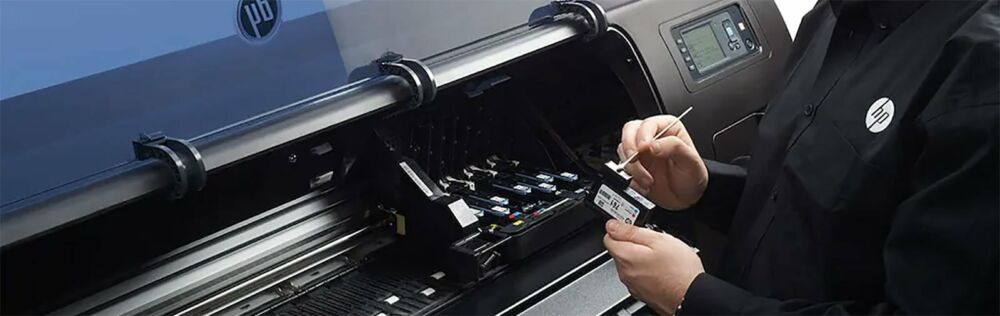
We get calls about the DX7 every single week.
Someone's Roland RE-640 is banding. A VS-640 is dropping a colour channel. A shop owner in Texas just ran a nozzle check and half the nozzles are gone. Nine times out of ten, the conversation ends the same way — it's time for a new printhead.
The DX7 is the heart of some of the most popular wide-format eco-solvent printers Roland has ever made. When it's running well, you don't think about it. When it starts failing, it can bring your whole production to a stop. So here's everything we know about it — from what it actually does, to how to make it last longer, to what to look for when you need to replace it.
Buy the genuine Roland DX6 printhead for RE-640, VS-640 and RA-640
- Roland RE-640 DX6 printhead 6701409010
- Roland VS-540i DX6 printhead 6701409010
- Roland VS-series DX6 printhead 6701409010 (all VS/RE/RA/BN models)
- Roland printheads — DX4, DX6, DX7
In stock · Ships same day from Doral, FL on orders before 2 PM EST · Genuine OEM, sealed
What Makes the DX7 Different
The Epson DX7 is a seventh-generation MicroPiezo printhead. Roland uses it across their VS, RE, and RA series — machines that have become workhorses for vehicle wraps, outdoor signage, retail graphics, and banner production worldwide.
What set the DX7 apart when it launched was its drop control. It can fire ink droplets as small as 1.5 picoliters — that's a level of precision that lets you get smooth gradients, clean edges on text, and photo-quality output on eco-solvent media. Eight ink channels, 180 nozzles per channel, 1,440 nozzles total. Native resolution up to 1,440 dpi. Firing frequency up to 8 kHz.
For a print shop running vehicle wraps or high-detail retail graphics, those specs matter day to day.
One thing that trips people up — the DX7 comes in two versions: 1st coded and 2nd coded. They look identical. They are not interchangeable. Your Roland is built for one specific version, and if you install the wrong one the printer simply won't recognise it. Always check before you order. We confirm this with every customer before we ship.
Which Roland Printers Use the DX7
The DX7 is used in:
Roland RE-640, VS-640, VS-640i, VS-540, VS-540i, VS-420, VS-300, VS-300i, RA-640, RF-640, RF-640a, XR-640, XF-640, XT-640, RT-640, and BN-20.
If your machine is on that list and you're having print quality issues that cleaning cycles aren't fixing, the printhead is the first place to look.
How the DX7 Compares to DX5 and DX6
We sell all three, so we get this question constantly. Here's the plain answer.
The DX5 is the older generation — solid and reliable, used in Roland SP, SC, and XC series as well as Mimaki JV33 and Mutoh ValueJet machines. Good head, but larger minimum drop sizes and lower nozzle count compared to the DX7.
The DX6 sits alongside the DX7 in some Roland VS series machines — you'll know it by its part number 6701409010. It has 360 dpi native resolution and 8 channels of 180 nozzles. Excellent for production work.
The DX7 is the step up — finer drop control, better ink channel isolation, and more consistent output on detailed work. If you're doing vehicle wraps or fine-art reproduction, the DX7 is where you want to be.
None of them are interchangeable with each other. Your printer is built for one specific head.
5 Signs Your DX7 Is Telling You It's Done
We've handled enough failed heads to know what the warning signs look like. Here's what to watch for.
Banding that won't go away. Light horizontal lines running across your prints in the direction the printhead travels. If you've run three or four cleaning cycles and they're still there, it's not a clog — it's nozzles that have stopped firing permanently.
A whole colour disappears. When an entire ink channel goes silent, that's usually a failed piezo element inside the head, not a blockage you can clear. A cleaning cycle won't bring it back.
Ink misting or fuzzy edges. If your text has a soft halo around it or you're seeing fine ink spray around printed elements, the piezo elements are no longer firing with precision. The head is degrading.
You're cleaning it every day. A healthy DX7 might need a cleaning cycle once a week, maybe twice. If you're running cleans multiple times a day just to maintain output, the nozzle plate is worn and it's only going to get worse.
Your Roland is throwing error codes. Roland printers run electronic checks on the printhead. When those codes start appearing, it's the printer telling you directly that the hardware has failed — not something a cleaning kit will fix.
How to Make Your DX7 Last Longer
This is the part most people skip, and then they wonder why they're replacing heads more often than they should be.
Don't let it run dry. Ink isn't just what you print with — it cools and lubricates the nozzle assembly. A dry printhead overheats. We've seen heads fail within hours of running out of ink. Monitor your levels and never let a colour hit empty while the machine is running.
Use your ink within six months of opening. Eco-solvent ink changes viscosity as it ages. Old ink sits differently in the nozzle channels and creates blockages that are much harder to clear than fresh ink clogs.
Run a weekly cleaning cycle even when the printer is idle. A printer that sits untouched for two weeks is a printer with drying ink sitting on the nozzle plate. Even if you're not printing, run a nozzle check and cleaning cycle once a week.
Let the printer shut itself down properly. The capping station exists for a reason — it seals the nozzle plate from air when the printer is off. Never cut power manually mid-cycle or skip the shutdown process. The three minutes it takes to cap properly is protecting a $1,000 component.
Change your dampers regularly. Worn dampers restrict ink flow and cause the printhead to misfire in ways that look exactly like head failure. If you're troubleshooting a failing DX7, always check and replace the dampers first — it's a $15 fix that sometimes saves a $1,000 replacement.
What to Look for When You're Buying a Replacement
Two things matter most: authenticity and coding version.
Genuine OEM only. We've seen what compatible and clone DX7 heads look like after 90 days — inconsistent nozzle performance, premature failure, and often damage to the damper system from inconsistent ink viscosity. The cost saving disappears fast. The DX7 in your Roland was engineered specifically for those ink channels and that firing system. A genuine Epson OEM head is the only thing that performs the way your printer expects.
Confirm your coding version before you order. 1st coded and 2nd coded heads look identical in photos and descriptions. Getting this wrong means the printer won't recognise the head and you're back to square one. At Digiprint USA, we ask every customer to confirm their coding version before we process the order. If you're not sure, our team can walk you through how to find it — just reach out before you buy.
We stock both versions and ship same day from our Miami, FL warehouse. Most US customers receive their head the next business day.
Quick Answers to Questions We Hear Every Week
Can I use a DX7 from a VS-640 in a RE-640? Yes, as long as the coding version matches. The head itself is the same — it's the coding that's machine-specific.
How long should a DX7 last? With proper maintenance, three to five years in regular production. High-volume shops running two shifts sometimes see shorter lifespans. Shops that maintain their machines well sometimes get longer.
Can a clogged DX7 be saved? Mild clogs — yes. A printhead cleaning kit with the right solvent can clear fresh blockages. Hardened clogs from old ink, physical damage, or failed piezo elements — no. If it's been sitting dry or you're getting electronics errors, it needs replacing.
Do you offer help with installation? Yes. Our technical team is available before and after purchase to walk you through the process. Call us, use the chat on the site, or send an email — we're based in Miami and available Monday to Friday.
If your Roland is showing any of the signs above and you need to talk through what's happening before you order, get in touch. We'd rather spend ten minutes helping you diagnose the problem correctly than have you order the wrong part.
And if you already know what you need — shop our DX7 printhead listings here and order before 2 PM EST for same-day shipping.
Replace with the head — order these together
- RE-640 / VS-640 cap top 6000007135
- Roland VS-640 ink damper 1000012719
- RA-640 / RE-640 / VS-640 head data cable set (4 pcs)
In stock · Ships same day from Doral, FL on orders before 2 PM EST · Genuine OEM, sealed


Leave a comment
This site is protected by hCaptcha and the hCaptcha Privacy Policy and Terms of Service apply.