
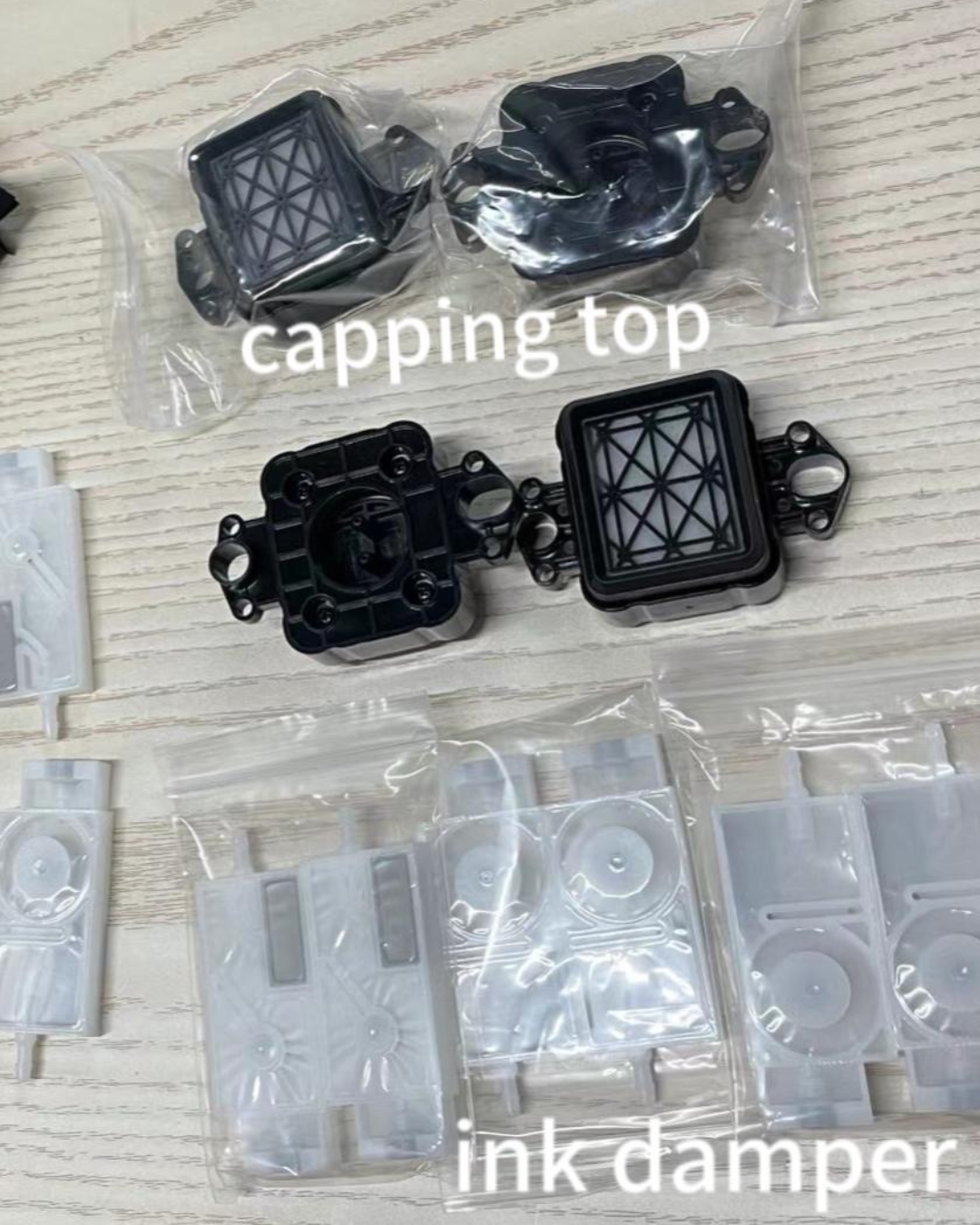
Most wide-format and DTF printhead failures are caused by three inexpensive consumable parts — not the head itself. Dampers regulate ink flow between the tank and printhead and should be replaced every 6–12 months, or immediately when you see single-channel color dropout, air bubbles in ink lines, or ink leaking from the housing. Capping stations seal the nozzle plate during downtime to prevent overnight drying and should be inspected every 3 months and replaced annually or whenever cleaning cycles stop clearing clogs. Wiper blades clean the nozzle face before each print cycle and should be replaced every 3–6 months, or when print quality degrades gradually over weeks. All three parts together cost $80–150 — replacing them at every printhead installation is the most effective way to protect a $900 head.
The printhead gets all the attention. It's the expensive part, the one that gets replaced when print quality collapses, the one shops obsess over. But in most cases, the head didn't fail on its own. Something upstream of it failed first.
Dampers, capping stations, and wiper blades are the three components that touch or support the printhead every single print cycle. They cost between $15 and $60 each. When they wear out — and they do, because they're consumables — they create the conditions that destroy heads.
Most shops replace these parts only after a major problem. That's backward. Here's what each part does, how it fails, and when to replace it before it costs you a $900 head.
Shop the spare parts covered in this guide
- Dampers — all brands
- Capping stations
- Wiper blades
- Head data cables
In stock · Ships same day from Doral, FL on orders before 2 PM EST · Genuine OEM, sealed
Dampers: the ink flow regulators
A damper sits between the ink cartridge or bulk tank and the printhead. Its job is to regulate ink flow — it absorbs pressure fluctuations in the ink system and delivers a consistent, controlled supply to the nozzles. Each color channel has its own damper. On a standard CMYK + white DTF setup, that's five dampers minimum.
When a damper fails, the first symptom looks exactly like a clogged printhead. A specific color drops out, prints show missing lines in one channel, output goes faded in one area. Shops run cleaning cycle after cleaning cycle trying to fix what looks like a clog — but the head is fine. The damper has stopped delivering ink properly.
The three main failure modes:
Air in the ink line. The damper membrane or seal has degraded and air is getting into the ink path. This causes intermittent jetting — the channel fires sometimes and not others, producing inconsistent lines rather than a clean missing-line pattern.
Ink starvation. The internal filter has clogged with pigment sediment, restricting flow. Color channels look pale or faded even after cleaning. DTF white ink is the worst offender because of its high pigment load and tendency to settle.
Ink leaking from the damper body. If you see ink pooling around the damper housing or dripping inside the carriage, the seal has failed. This needs immediate attention — ink near the carriage board is a short circuit waiting to happen.
Replace dampers every 6 to 12 months under normal production, or any time you see air bubbles in the ink lines, a persistent single-channel dropout that cleaning cycles won't clear, or visible leakage from the housing. They're one of the most overlooked items in a maintenance budget and one of the highest-impact swaps you can make.
Capping stations: the printhead's parking space
When the printer isn't actively printing, the printhead parks on the capping station. The cap creates an airtight seal around the nozzle plate, preventing ink in the channels from drying out during downtime. Every time the printer parks, the cap is what keeps the head alive.
The capping station also performs ink suction during cleaning cycles — it creates negative pressure to pull ink through the nozzles. A cap that doesn't seal properly can't generate that suction, so cleaning cycles accomplish nothing.
The three main failure modes:
Cracked or hardened rubber. The cap is rubber and rubber degrades over time, especially with temperature swings. When it cracks or stiffens, the seal breaks. The head sits "parked" but exposed to air, and nozzles dry out overnight. You come in the next morning to missing lines that weren't there when you shut down.
Ink buildup inside the cap. Dried ink accumulates in the cap cup over time. This buildup prevents the cap from seating flush against the nozzle plate — same result as a cracked cap, just a slower failure. Cleaning the cap as part of your daily routine delays this significantly.
Weak suction. The vacuum pump weakens or the cap's internal passages partially block. Cleaning cycles run but the suction isn't strong enough to pull through stubborn clogs. The printer reports a completed cycle but the nozzle check looks the same or worse.
Inspect the capping station every 3 months. Replace it annually minimum — sooner if there's visible cracking, if the rubber has gone hard, or if cleaning cycles stop working on clogs that would normally clear. The replacement costs a fraction of a dried-out printhead.
For how capping station condition connects directly to recurring clog problems, see our guide on how to clean an Epson i3200 printhead — the peripheral check in that guide applies across most wide format machines.
Wiper blades: the nozzle face cleaner
Before each print cycle, the wiper blade runs across the nozzle plate to remove residual ink, dust, and any buildup on the nozzle face. A wiper blade in good condition makes one pass and leaves a clean surface. A wiper blade saturated with dried ink makes one pass and deposits that ink back onto the nozzle face.
This is where things get subtle. A failing wiper doesn't cause an immediate obvious fault. It causes gradual degradation. Print quality gets slightly worse over weeks. Clogs appear more frequently. Cleaning cycles need to run more often. Shops assume it's a head issue and start running more cycles — which stresses the head further. The actual cause is a $20 wiper blade that needs swapping.
The three main failure modes:
Ink saturation. The blade absorbs ink over time. Once saturated, it stops cleaning and starts contaminating. Every wipe deposits a fresh layer of dried ink back onto the nozzle plate.
Physical wear. The wiper edge wears down with use, particularly on high-volume machines. A worn edge doesn't make proper contact with the nozzle plate, leaving residue behind. Some parts of the nozzle face are cleaned and some aren't, leading to inconsistent print patterns.
Hardening. In environments with temperature variation, the wiper material can harden and lose flexibility. A stiff wiper applies uneven pressure across the nozzle plate — and over time can scratch the nozzle surface. Scratched nozzles are permanent damage.
Replace wiper blades every 2 to 3 months under normal production volume. On high-volume DTF setups pressing 300+ transfers per day, check monthly. At minimum, clean the wiper as part of your daily startup. If it's visibly saturated with dried ink or the edge looks uneven, replace it now.
The failure pattern most shops don't recognize until it's too late
A printhead rarely fails from one dramatic cause. It fails from accumulated neglect of these three components over 6 to 12 months. The pattern goes like this:
The wiper blade goes past its useful life and starts depositing ink back onto the nozzle plate instead of cleaning it. Clog frequency increases. The capping station rubber begins to crack — overnight drying becomes a regular occurrence and morning startups need more cleaning cycles. Those cleaning cycles consume more ink and stress the head. Meanwhile, a damper starts restricting flow in the white channel. What looks like a white ink clog is actually ink starvation from the damper. More cleaning cycles. More stress. Eventually the head gets replaced.
The new head goes in and fails faster than expected — because the capping station that was slowly killing the old head is still there, working on the new one.
The annual replacement cost for all three components runs under $150 on most machines. One printhead replacement runs $900 or more. The math is not complicated.
What to stock
For any wide format or DTF setup running daily production, keep one set of spares on hand: one capping station, one wiper blade, and a set of dampers for your specific machine. That's roughly $80 to $150 sitting on a shelf, ready to swap when something starts to fail rather than after the head is gone.
Digiprint USA stocks capping stations and dampers for major wide format brands including Epson, Roland, Mimaki, and Mutoh, all shipping same day from Doral, Florida. If a capping station fails mid-week, you have a replacement the next morning without paying overnight rates.
If you're already seeing print issues and trying to diagnose whether it's the head or one of these peripherals, work through the troubleshooting in our guide on why your printer keeps clogging — the peripheral check comes before any cleaning solution or flush, because these parts are wrong more often than the head is.
And if you've confirmed the head itself needs replacing, browse our full catalog of genuine OEM printheads — same day shipping, authentic seal, Florida stock.
Or get the full set in one kit
- Epson i3200-A1 DTF maintenance kit — dampers + cables + cap station
- Epson XP600 DTF maintenance kit — printhead + 29-pin cables + dampers
- Epson i3200 / i1600 / XP600 / 5113 damper
- XP600 capping station
In stock · Ships same day from Doral, FL on orders before 2 PM EST · Genuine OEM, sealed




Leave a comment
This site is protected by hCaptcha and the hCaptcha Privacy Policy and Terms of Service apply.