
 }
}Epson XP600 With Orignal Seal Printhead with 29-Pin Data Cables Maintenance Kit
Brand: Epson
Tax excluded. Shipping calculated at checkout
Availability: In stock
%20with%20the%20original%20Epson%20Seal%20Logo%20intact,%20and%202%20replacement%2029-pin%20flat%20data%20cables%20%E2%80%94%20the%20complete...
)
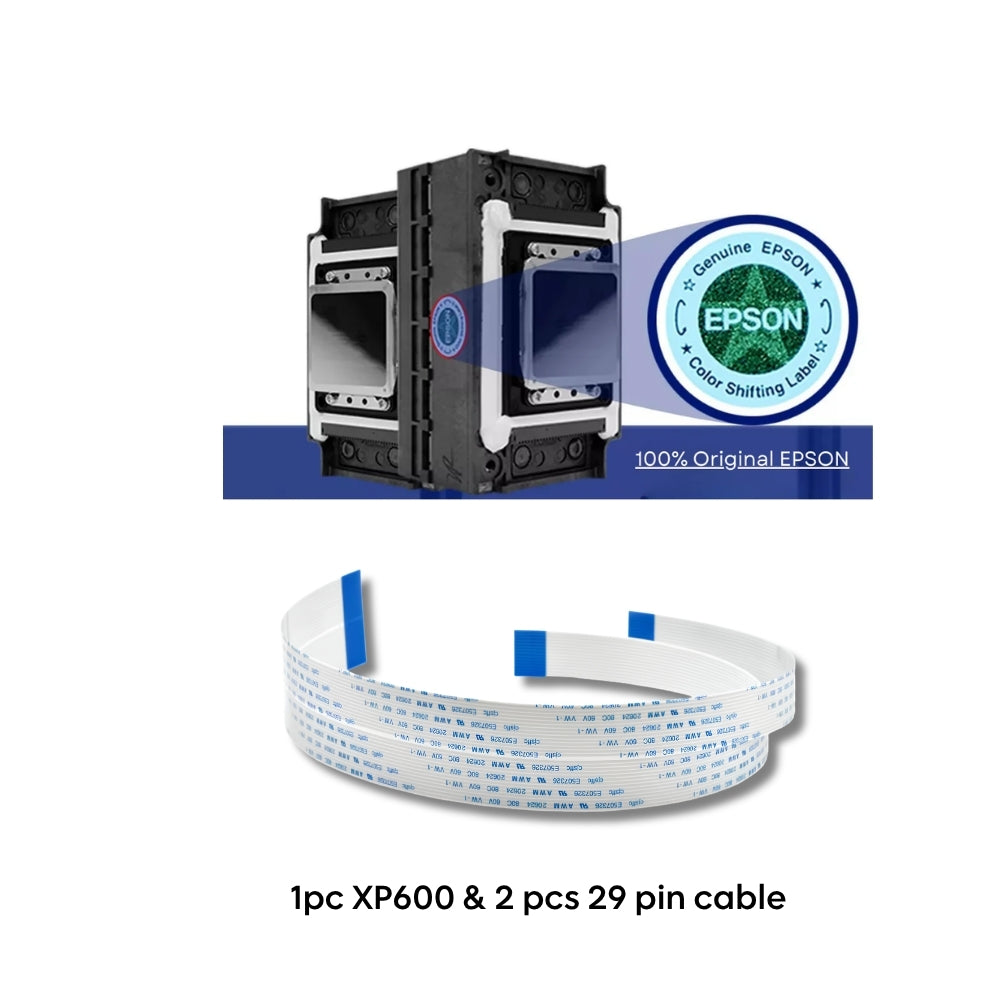
The Epson XP600 DTF Maintenance Kit contains 1 genuine original Epson XP600 printhead (F1080-A1) with the original Epson Seal Logo intact, and 2 replacement 29-pin flat data cables — the complete hardware required for a correct XP600 printhead replacement on DTF, dye-sublimation, UV flatbed, and eco-solvent printers. The Epson Seal Logo on the F1080-A1 packaging is the highest level of authenticity verification available for the XP600 printhead — confirming the head is 100% genuine original, directly sourced, never opened, and untampered. Two 29-pin cables are required per XP600 installation — this kit includes both, eliminating the most common cause of post-installation failure: installing a new head on worn or micro-fractured cables. Compatible with all DTF printers built on the Epson XP600 / DX11 / F1080 platform — including Colorsun, Fedar, Yuxunda, Sinocolor, Oric, and hundreds of Chinese-manufactured XP600-based DTF printers worldwide.
⚠️ All sales final once the printhead is installed — no returns or refunds after installation. Due to the delicate nature of DTF, UV, and eco-solvent inks and the risk of damage from improper installation or nozzle blockage, we cannot accept returns, exchanges, or refunds once the XP600 printhead has been installed. Install only by trained technicians. Confirm your printer model is compatible before ordering. Contact us for compatibility confirmation before purchase.
F1080-A1 (Epson Seal, this kit) vs FA09121 (no seal) — same printhead, different verification. Both are 100% genuine original Epson XP600 printheads from the same production line — FA09121 is a later revision code for the same head. Both fit identical printers and perform identically. This kit contains the F1080-A1 with the original Epson Seal Logo on the packaging. The FA09121 listing is the same head without the seal at a lower price point.
What Is Included in the Kit
| Component | Quantity | Specification |
|---|---|---|
| Epson XP600 Printhead — F1080-A1 (Epson Seal) | 1 | Genuine original Epson F1080-A1 — Epson Seal Logo confirmed — 1,080 nozzles, 1440 dpi, MicroPiezo, water-based/UV/eco-solvent. Japan-made. |
| 29-Pin Data Cables | 2 | 29-pin flat flexible cable, 400mm length, 30mm width, copper conductor — complete set (2 cables required per XP600 head) |
Epson XP600 F1080-A1 Technical Specifications
| Specification | Detail |
|---|---|
| Part numbers | F1080-A1 / FA09121 / FA09050 / FA09xxx series |
| Also known as | Epson XP600, DX11, F1080-A1 |
| Technology | Epson MicroPiezo drop-on-demand |
| Total nozzles | 1,080 (6 rows × 180 nozzles per row) |
| Nozzle resolution | 180 NPI per row / 360 NPI per 2 rows |
| Native resolution | 1440 dpi |
| Jetting frequency | 46kHz (single mode) / 11.52kHz (multi mode) |
| Drop volumes | 4.5pl / 9pl / 20pl / 40pl (multi mode) — 1.5pl minimum variable |
| Viscosity range | 3–5 mPa·s |
| Colour channels | Up to 6 colours |
| Effective print width | 25.4mm (1 inch) |
| Dimensions | 84.9 × 57.2 × 42.6mm |
| Weight | 60g |
| Ink compatibility | Water-based, DTF pigment, dye-sublimation, eco-solvent, UV-curable |
| Interface | 29-pin flat flexible cable connector (2 cables per head — both included) |
| Authenticity | Original Epson Seal Logo intact — highest authenticity verification for XP600 |
| Country of origin | Japan |
Which DTF Printers Is This Maintenance Kit Compatible With?
This maintenance kit is compatible with all DTF, sublimation, and UV printers using the Epson XP600 / DX11 / F1080 printhead, including:
Not sure if this kit fits your printer? Contact us — our US-based support team will confirm compatibility before you order.
Why Do XP600 29-Pin Data Cables Need Replacing With Every Printhead?
The XP600 printhead uses two 29-pin flat flexible cables that flex with every carriage pass during printing. In a production DTF environment running 8+ hours daily, these cables undergo approximately 30–50 million flex cycles per year. Each cycle stresses the copper conductor traces at the cable's bend radius. Over time, micro-fractures form in the conductor traces — invisible to the naked eye but causing intermittent signal loss that produces random nozzle dropout, banding, and colour channel failure symptoms identical to a failing printhead. Technicians who install a new XP600 on old cables frequently encounter the same print defects within days or weeks and incorrectly conclude the new head is defective. Both 29-pin cables must be replaced simultaneously with every printhead installation. This maintenance kit supplies them together with the head — preventing the most common and costly XP600 service mistake.
How to Install the XP600 F1080-A1 — Correct Service Order
Step 1 — Power off the printer and move the carriage to the maintenance position before opening the print bay.
Step 2 — Remove the old printhead. Inspect the capping station and wiper blade — replace the capping unit if the cap top is worn or contaminated with dried ink.
Step 3 — Replace both 29-pin cables. Label cable positions before removal. Install both new cables from this kit before seating the new printhead. Never reuse old cables.
Step 4 — Replace the PDAEPI3200 damper. Install a fresh damper pre-filled with ink before connecting to the ink manifold. The XP600 uses 2 dampers — replace both.
Step 5 — Install the new F1080-A1 printhead and secure. Run an initial head flush using the printer's maintenance menu.
Step 6 — Run a nozzle check pattern. Confirm all 1,080 nozzles are firing before resuming production. Allow 24 hours for full nozzle stabilisation after installation.
XP600 vs i3200-A1 — Choosing the Right DTF Maintenance Kit
| Specification | XP600 F1080-A1 (this kit) | Epson i3200-A1 Kit |
|---|---|---|
| Total nozzles | 1,080 | 3,200 — 3× more |
| Resolution | 1440 dpi | 600 dpi native |
| Print width | 25.4mm (1") | 33.8mm (1.33") |
| Cables in kit | 2 × 29-pin (400mm) | 4 × 14-pin |
| Price point | Lower — entry/mid DTF | Higher — production DTF |
| Best for | Entry-level and mid-volume DTF, sublimation, UV converted printers | High-volume production DTF shops |
Why Buy from Digiprint USA
• Complete maintenance kit — F1080-A1 Epson Seal printhead + both 29-pin cables in one shipment
• Original Epson Seal Logo intact — highest authenticity verification for the XP600 printhead
• 100% genuine original Epson — same production head as FA09121, with Epson Seal
• Both cables included — eliminates the #1 cause of post-installation XP600 failure
• In stock in Doral, Miami FL — same day shipping before 2PM EST
• We also stock PDAEPI3200 dampers and XP600 capping units — contact us to complete your service order
• Ideal for Latin American DTF print shops using Miami freight forwarders
Browse our full range of DTF printer parts and supplies including dampers, capping units, and cleaning solutions.
View all genuine Epson printheads stocked by Digiprint USA.
Frequently Asked Questions
What is included in this XP600 maintenance kit?
The kit contains 1 genuine original Epson XP600 printhead (F1080-A1, Epson Seal Logo confirmed — 1,080 nozzles, 1440 dpi, MicroPiezo, Japan-made) and 2 replacement 29-pin flat data cables (400mm, 30mm wide, copper conductor). Two cables are required per XP600 installation — this kit provides the complete set. This is everything needed for a correct XP600 DTF printhead service.
What is the difference between F1080-A1 (this kit) and the FA09121 kit?
Both contain a 100% genuine original Epson XP600 printhead — F1080-A1 and FA09121 are the same physical head with different revision codes. This kit (F1080-A1) includes the original Epson Seal Logo on the packaging — the only independent confirmation of genuine original authenticity. The FA09121 kit is the same head at a slightly lower price without the seal. Both kits include 2 × 29-pin cables.
Why are both 29-pin cables included in the kit?
The XP600 requires 2 data cables per head — both must be replaced simultaneously with every printhead. Old cables develop micro-fractures from repeated flex cycles that cause nozzle dropout identical to a failing printhead. Replacing only one cable, or reusing old cables, produces the same failures on the new head within days. This kit supplies both to ensure a correct, complete installation.
Do I need to replace the damper as well?
Yes — the PDAEPI3200 damper is compatible with the XP600 and should be replaced at every head installation. Old dampers have degraded seals that disrupt correct ink back-pressure on the new head. The XP600 uses 2 dampers. We stock the PDAEPI3200 separately — contact us to add it to your order before checkout to avoid a second shipping charge.
Do you ship XP600 maintenance kits to Latin America?
Yes — same day shipping from our Doral, Miami FL warehouse for orders placed before 2PM EST. Digiprint USA is in Doral — the primary freight forwarder hub for Latin America — making us the closest US supplier to DTF operations in Colombia, Mexico, Brazil, Peru, Chile, Argentina, and the Caribbean.